
对话框/Tips
20种炫酷打开模态窗口动画特效插件
 PetitQ
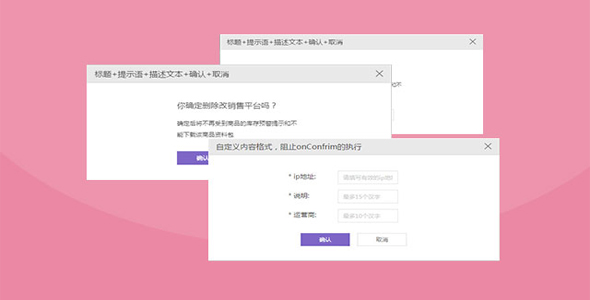
xdialog 是一款炫酷打开模态窗口动画特效插件。该插件提供 20 种打开模态窗口的动画特效,并提供丰富的配置参数和 api 来控制模态窗口,非常实用。
使用方法
在页面中引入 xdialog.css 和 xdialog.js 文件。
也想出现在这里?联系我们吧

<link rel="stylesheet" href="xdialog/xdialog.css" />
<script src="xdialog/xdialog.js"></script>
创建模态窗口
let dialog1 = xdialog.open();
dialog1.close();
let dialog2 = xdialog.create({title: 'Hello dialog'});
dialog2.show();
dialog2.hide();
dialog2.destroy();
配置参数
xdialog.js 插件的可用配置参数有:
// dialog title// use null value to remove titletitle: 'Dialog Title',
// dialog body// use null value to remove bodybody: '<p>Dialog body</p>',
// dialog buttons,//// valid values:// - array// - predefined button name or user defined button html like// ['ok', 'cancel', 'delete', '<button id="my-button-id" class="my-button-class">Button-text</button>']// - object// - button name to button text(predefined) or button html(user defined) or attribute object map like// {// ok: {// name: '删除',// style: 'background:#f44336;'// },// delete: '删除',// cancel: '取消',// other: '<button id="my-button-id" class="my-button-class">Button-text</button>'// }buttons: ['ok', 'cancel'],
// dialog extra style// for example 'width: auto;'style: '',
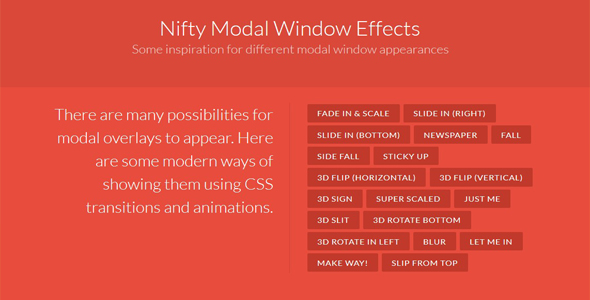
// dialog show/hide effect, one of the following values// - fade_in_and_scale'// - slide_in_right'// - slide_in_bottom'// - newspaper'// - fall'// - side_fall'// - sticky_up'// - 3d_flip_horizontal'// - 3d_flip_vertical'// - 3d_sign'// - super_scaled'// - just_me'// - 3d_slit'// - 3d_rotate_bottom'// - 3d_rotate_in_left'// - blur'// - let_me_in'// - make_way'// - slip_from_top'//// use null value to disable effecteffect: 'fade_in_and_scale',
// fix dialog blur for chrome browser with/without transform and/or with/without perspective//// true: to fix// false: not to fix//fixChromeBlur: true,
// modal or notmodal: true,
// callback before showbeforeshow: null,
// callback after showaftershow: null,
// callback when OK button pressed// return false to avoid to be closedonok: null,
// callback when Cancel button pressed// return false to avoid to be closedoncancel: null,
// callback when Delete button pressed// return false to avoid to be closedondelete: null,
// callback when dialog is about to be destroyed// return false to avoid to be destroyedondestroy: null,
其中 effect 参数可以配置模态窗口的显示动画效果,可用的配置动画项有:
- fade_in_and_scale
- slide_in_right
- slide_in_bottom
- newspaper
- fall
- side_fall
- sticky_up
- 3d_flip_horizontal
- 3d_flip_vertical
- 3d_sign
- super_scaled
- just_me
- 3d_slit
- 3d_rotate_bottom
- 3d_rotate_in_left
- blur
- let_me_in
- make_way
- slip_from_top
API
- xdialog.init(options)
// initialize xdialog- xdialog.create(options)
// create a dialog- xdialog.open(options)
// create a dialog and show it- xdialog.alert(text, options)
// create an alert dialog and show it- xdialog.confirm(text, onyes, options)
// create a confirm dialog and show it- xdialog.dialogs()
// access all dialog instances- xdialog.startSpin()
// start spin animation- xdialog.stopSpin()
// stop spin animation- dialog.element()
// dialog html element- dialog.show()
// show dialog- dialog.hide()
// hide dialog- dialog.destroy()
// destroy dialog- dialog.close()
// hide dialog and destory it- dialog.adjust()
// adjust dialog to make whole dialog visible- dialog.fixChromeBlur()
// fix chrome blur
Github 网址:https://github.com/xxjapp/xdialog
| 演示地址 | 下载地址 |
专业提供WordPress主题安装、深度汉化、加速优化等各类网站建设服务,详询在线客服!
也想出现在这里?联系我们吧